Use the rules for the version you actually open. Similar titles and operator promotions are not interchangeable.
Understand the flight before choosing panel settings
Several panels still share one flight
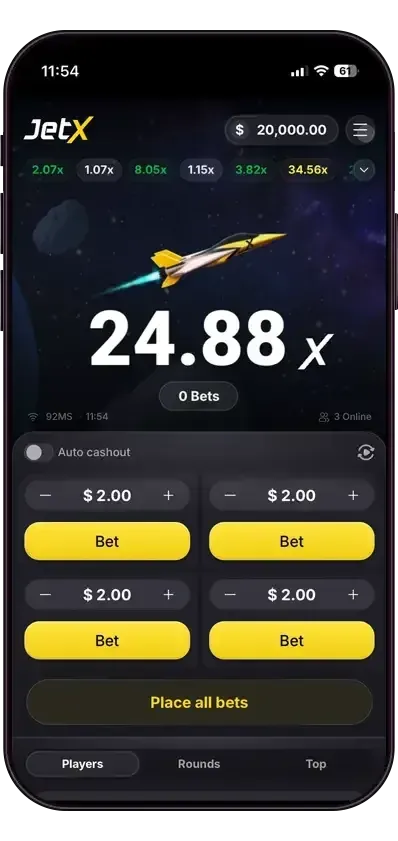
The current captured interface has four panels, while the older operator guide describes two. Check your loaded client before following a four-panel example. A queued selection is not necessarily an accepted bet on the flight already running; the settlement history determines which stakes belong in its total.
Four accepted R10 stakes mean R40 exposed to the same flight. They do not create four independent crash outcomes. Separate cashout targets change when each accepted panel may settle, but the panels still depend on the shared flight ending. Counting the winning panels alone can hide a net loss across the round.
Returns include the stake
Suppose four accepted panels cost R10 each and their returns are R15, R20, zero and zero. Total return is R35 against R40 staked, leaving a R5 net loss. The two paid panels made R5 and R10 above their own stakes; those gains did not cover the other R20 lost. These are illustrative amounts, not recorded JetX results.
Our settlement calculator lets you change each panel independently. Enter the final credited return, including the returned stake, and leave unused panels at zero. Do not enter a multiplier into a money field or add the public player list to your own returns. The worksheet checks arithmetic; it cannot check whether a server accepted a cashout.
Auto-cashout, automatic play and history have separate jobs
An auto-cashout target concerns the exit of an accepted bet. Automatic play concerns placing subsequent bets under the available controls. Setting one does not prove that the other is enabled. Review the active panel and accepted status before treating a visible target as a confirmed instruction.
After a connection interruption, inspect the completed history before replacing the stake. Record the flight reference, time, active panels and settled returns if support needs to reconcile it. The final ledger can differ from the last animation you saw; we have not verified an individual connection complaint or a guaranteed response time.
Keep optional promotions separate from the core game
An operator may present jackpot or MegaDrop promotions alongside JetX. Their visibility does not establish eligibility, dates or qualifying stake for another account. Check those conditions independently. Ordinary JetX and JetX3 are also distinct titles; a complaint about one does not identify the rules of the other.
We do not assign an exact RTP to the new captured build without matching version-specific rules. A detailed interface description should make that uncertainty easier to see, rather than filling the gap with a percentage copied from a different client.
Two-bet and four-bet instructions can both exist.
SmartSoft’s current product page advertises four simultaneous bets. Hollywoodbets’ older guide describes two bet panels. These are version-specific descriptions, not a reason to claim every operator has four.
Our demo link launches the newer JetX category from the provider’s own page. Check how many panels your operator client actually displays.
SmartSoft’s promotional screenshot of the new mobile client. Displayed balance and multiplier are not our test results.
What the newer interface lets you inspect.
The provider describes auto-play, auto cash-out, live player data and round history. Inspect each bet panel separately before placing a stake; the presence of more panels can increase total exposure.
The provider also markets MegaDrop and Jackpot tools for operators. Their availability and promotion terms depend on configuration; we do not promise either on a listed South African account.
The small-screen layout matters.
The official mobile image places the flight above four separate stake panels. Read the value on every active panel before using a shared placement action.
Check that you can read the stake and find the correct collect control before increasing exposure. Fullscreen can help, but do not assume a different browser layout changes the game’s result.
 Independent South Africa guide